SEO migration
Website migration SEO checklist: before, during and after launch
Everything to check before, during and after a website migration so rankings, backlinks and traffic move with the site instead of staying behind.
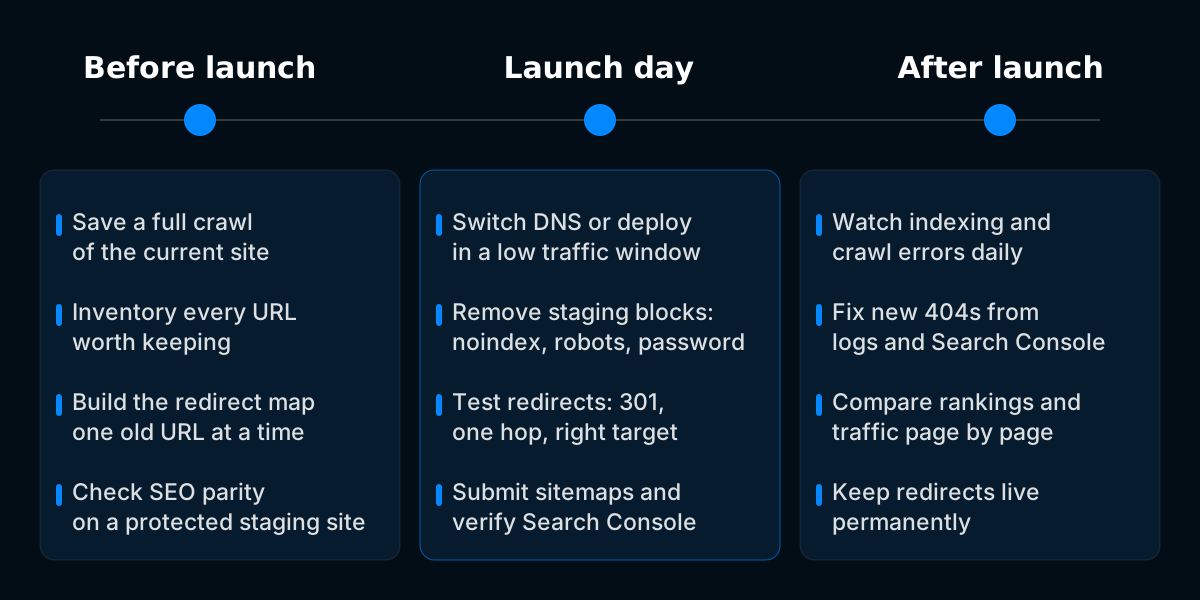
A website migration keeps its rankings when every URL that earns traffic or links has a matching destination, a permanent redirect sends people and crawlers there in one hop, and the new pages are as easy to crawl and understand as the old ones. This checklist covers all three, in the order the work actually happens.
It applies to domain changes, platform changes, URL restructures, HTTPS moves and redesigns that touch templates or navigation. Use the sections that match your project and skip what does not apply.
What counts as a website migration
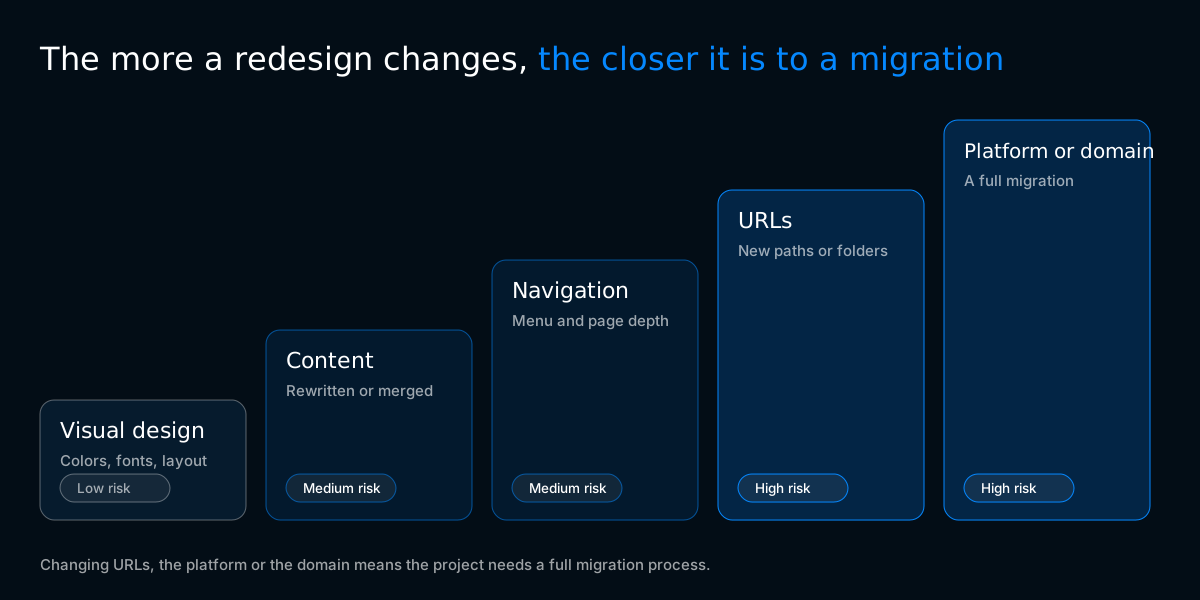
A website migration is any change that alters the URLs, content, templates or infrastructure search engines have already indexed. Some migrations change every URL on the site, others change none, but each one can break the signals Google uses to rank existing pages.
| Migration type | What changes | Main SEO risk | Change of Address tool |
|---|---|---|---|
| Domain change | Every URL moves to a new hostname | Lost link equity if redirects are incomplete | Yes |
| Platform change (for example Shopify to WooCommerce) | URL patterns, templates, structured data | Missing redirects and lost on-page elements | Only if the domain also changes |
| URL restructure | Paths, folders, slugs | Broken internal links and redirect chains | No |
| HTTP to HTTPS | Protocol on every URL | Mixed content, duplicate versions | No |
| Redesign on the same URLs | Templates, navigation, content | Removed content, weaker internal linking | No |
| Hosting or server move | Infrastructure only | Downtime, slower response times | No |
Google groups these into site moves with URL changes and site moves without URL changes, and the process differs between them (Google Search Central, site moves with URL changes).
Why migrations lose organic traffic
Migrations lose traffic when search engines can no longer connect old signals to new pages. The cause is almost always a technical decision made without checking its SEO effect, not the migration itself.
The usual causes are:
- Old URLs that return 404 instead of redirecting, so backlinks and rankings attached to them are lost
- Redirects that point to the homepage or a category instead of the matching page
- Redirect chains left over from earlier changes
- Titles, meta descriptions, headings or body copy dropped or shortened during the rebuild
- Canonical tags, hreflang or structured data missing from the new templates
- Staging protections such as noindex or a blocking robots.txt carried over to the live site
- Internal links still pointing at old URLs, which forces every click through a redirect
- Slower pages on the new platform
Each item on the checklist below exists to prevent one of these.
Before the migration
Pre-launch work decides most of the outcome. A migration that launches with a complete redirect map and a verified staging site rarely needs rescue work afterwards.
Save the starting point
Search Console, analytics and rank tracking keep their history through a migration. The old site itself does not, so save what will disappear with it.
Build a complete URL inventory
A crawl only finds pages linked from the site. Pages that lost their internal links but still get traffic or backlinks are the ones most often left without a redirect, so combine three sources:
Then decide what happens to each URL: keep, merge into another page, or remove. Pages you remove should either redirect to the closest relevant page or return 404 or 410 on purpose. Redirecting everything to the homepage looks tidy but gives search engines nothing to transfer.
Map every old URL to a new one
The redirect map is the core document of the migration. Each row is one old URL and its single final destination.
| Old URL | New URL | Type | Notes |
|---|---|---|---|
/services/web-design.html | /services/web-design/ | 301 | Extension removed |
/2021/04/pricing-guide/ | /blog/pricing-guide/ | 301 | Date folders removed |
/about-us/team/ | /about-us/team/ | none | Unchanged, no redirect needed |
/blog/spring-sale-2022/ | /blog/ | 301 | Merged, content outdated |
/old-landing-page/ | none | 410 | Removed on purpose |
Keep URLs the same wherever the new platform allows it. Every URL that does not change cannot break and needs no redirect. Changing the structure is fine when there is a reason for it, as long as every old URL is mapped.
Keep these rules while building it:
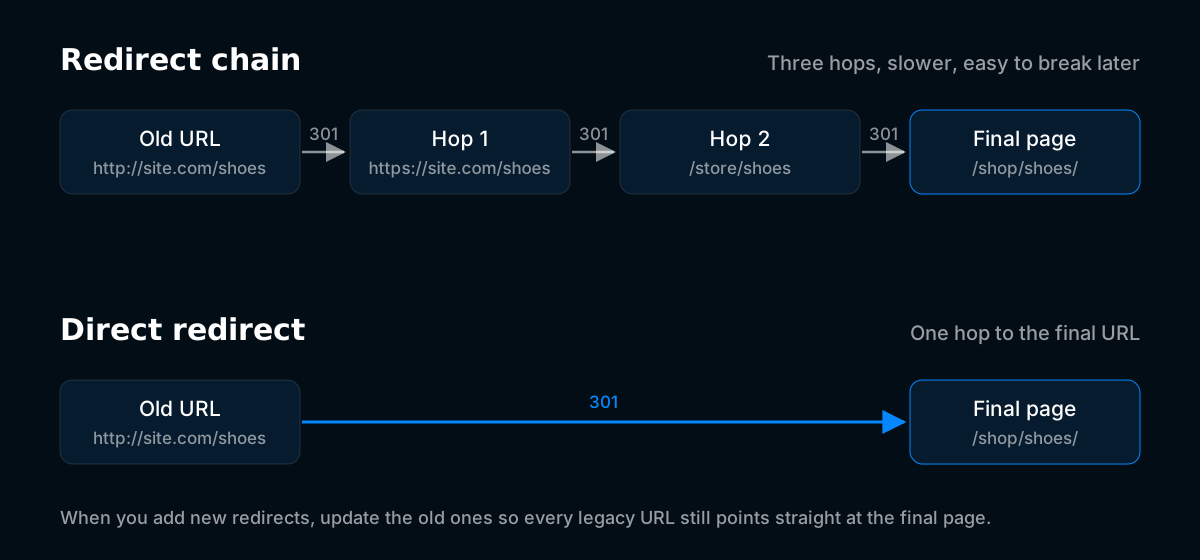
Google can follow up to 10 redirect hops but advises redirecting straight to the final destination (Google Search Central). Chains usually appear when a new migration stacks on top of redirects from an older one.
Keep on-page SEO elements intact
The new page should say at least as much as the old one. Migrations that change design and content at the same time make it hard to find the cause if rankings drop, so keep content changes for after launch where you can.
Update internal links
Internal links should point to new URLs directly. Relying on redirects for internal navigation slows every visit and wastes crawl activity.
Prepare and protect the staging site
Staging must be invisible to search engines while you build and fully visible the moment you launch. Both halves go wrong often.
Launch day
Launch day is an execution day, not a building day. Every decision should already be made, and the job is to switch over and verify.
- Switch DNS or deploy the new site.
- Remove every staging protection: noindex tags, X-Robots-Tag headers, blocking robots.txt rules and passwords.
- Upload the redirect rules if they are not already live.
- Test a sample of old URLs from every section of the map. Each should return a single 301 to the correct final URL with a 200 status.
- Test redirects for the most visited and most linked old URLs individually.
- Check robots.txt on the live domain and make sure it allows crawling of everything that should rank.
- Check that canonical tags on live pages reference the live domain, not staging.
- Submit the new XML sitemaps in Search Console.
- For a domain change, verify the new domain in Search Console and use the Change of Address tool (Search Console Help).
- Confirm analytics, Search Console and rank tracking work on the new site, and note the migration date.
- Run a full crawl of the live site and fix errors the same day.
After the migration
Post-launch monitoring catches problems while they are still small. Most issues show up in Search Console and server logs before they show up in revenue.
First week
First month
First three to six months
Rankings often move for a while after a migration while search engines recrawl and reprocess the site. A drop that is limited to specific pages usually points to a specific cause, such as a missing redirect or removed content, and is worth investigating immediately.
How long to keep redirects after a migration
Keep redirects permanently. Google recommends keeping them for at least one year, but in practice there is no reason to remove them: old URLs keep receiving visits from external links, bookmarks and emails for years, and a redirect costs almost nothing to keep.
For domain changes, keep the old domain registered and pointing at the redirects. If it expires, every redirect stops working and someone else can buy the domain along with its history.
Common migration mistakes and how to fix them
| Mistake | How it shows up | Fix |
|---|---|---|
| Noindex left on after launch | Pages drop out of the index, Search Console reports excluded pages | Remove the tag or header, request indexing for key pages |
| Robots.txt copied from staging | Crawling stops, sitemap URLs reported as blocked | Replace with the production robots.txt |
| Redirects to the homepage | Rankings for deep pages disappear | Redirect each URL to its closest equivalent |
| Redirect chains | Slow redirects, crawl reports show multiple hops | Point every rule straight at the final URL |
| Canonicals pointing to staging or old URLs | Wrong URLs indexed or pages ignored | Fix the template so canonicals self reference live URLs |
| Missing structured data | Rich results disappear | Rebuild the schema on the new templates |
| Images left on the old platform's CDN | Broken images once the old account closes | Download and rehost every asset |
| Internal links still using old URLs | Every click goes through a redirect | Update links in navigation and content |
When to get help with a migration
A migration is worth handing to a specialist when the site earns meaningful revenue from organic search, has thousands of URLs, runs several languages, or is changing platform and domain at the same time. Those are the projects where a single missed pattern can affect hundreds of pages.
Developtify's SEO migration service covers the full process in this checklist, from benchmark and redirect mapping to post-launch monitoring. Platform specific guides are available for Shopify to WooCommerce and WordPress to Webflow.
Frequently asked questions
Will a website migration always cause a traffic drop?
No. A migration with complete redirects, unchanged content and clean technical signals can keep its traffic. Short term movement in rankings is common while search engines recrawl the site, but lasting losses usually trace back to a specific missed step.
Should I use 301 or 302 redirects for a migration?
Use 301 or 308 redirects for any permanent move. Google recommends permanent server side redirects for site moves, and temporary redirects tell search engines the old URL may come back.
Do I need the Change of Address tool?
Only when the domain changes. The tool is not used for HTTPS moves, URL restructures or platform changes on the same domain.
Can I redesign and migrate at the same time?
You can, but it makes problems harder to diagnose. If rankings drop after a combined launch, you cannot tell whether the cause was the new URLs, the new templates or the new content. Moving first and improving second keeps the variables separate.
How many URLs should I test on launch day?
Test your highest value pages individually and a sample from every pattern in the redirect map. Then run a full crawl of the old URL list against the live site to catch anything the sample missed.