Platform migration
Shopify to WooCommerce migration without losing SEO
Migration tools move products and orders. This guide covers what they leave behind: URL structure, redirects, structured data and the details that decide whether rankings survive the move.
A Shopify to WooCommerce migration keeps its rankings when every Shopify URL is redirected to the matching WooCommerce URL in one hop, product and category content arrives intact, and the new store is at least as fast and crawlable as the old one. Migration tools handle the data. The SEO work around them is what this guide covers.
WooCommerce gives you full ownership of your store. The store, its code and its database belong to you: if a host stops working for you, you move the store to another one, and no platform can take it away. The trade is responsibility. On Shopify, hosting, security and performance are handled for you. On WooCommerce they are yours, and a store with a large catalog needs good hosting to stay fast.
The most common reason we see is cost. Shopify does a lot for you, and for many stores it is the right platform. But the plan, the paid apps for features WooCommerce covers with a plugin or a few lines of code, and the extra transaction fee Shopify charges when a store uses a third-party payment provider add up as the store grows.
The second reason is product policy. Shopify decides what can be sold on it, and that list changes. In June 2026 Shopify told merchants it no longer supports the sale of vape and e-cigarette products and gave them about two weeks to remove them, under a policy reported to apply globally (Vaping360, citing Reuters). Supplements are a quieter example: they are allowed, but in 2023, after an FDA determination on the ingredient NMN, Shopify told brands selling it to remove those products or find a new payment processor (SupplySide Supplement Journal). A WooCommerce store still needs a payment provider that accepts its category, but no single platform can remove that category overnight.
What transfers from Shopify to WooCommerce and what does not
Product data, customers and orders can be moved with a migration tool or CSV import. Themes, apps, passwords and anything built on Shopify specific features have to be rebuilt or replaced.
| Data or feature | Transfers | How |
|---|---|---|
| Products, variants, prices, SKUs | Yes | Migration tool or CSV |
| Product images | Yes | Migration tool, then check they are hosted on your server |
| Collections | Yes, as product categories | Migration tool or manual mapping |
| Customers (names, emails, addresses) | Yes | Migration tool or CSV |
| Customer passwords | No | Customers reset on first login |
| Order history | Yes, with most tools | Migration tool |
| Blog posts and pages | Yes | Migration tool or manual |
| SEO titles and meta descriptions | Depends on the tool | Verify every page after import |
| Product reviews | Depends on the reviews app | Export from the app, import to a WooCommerce reviews plugin |
| Metafields | Usually not automatically | Rebuild as custom fields |
| Theme and design | No | Rebuild in WordPress |
| Apps | No | Replace with plugins or custom code |
| Discount codes and gift cards | Usually not | Recreate |
| Subscriptions and saved payment methods | No | Plan separately with your payment provider |
| AI shopping channels (Agentic Storefronts, Knowledge Base) | No | Rebuild with product data, feeds and structured data |
Shopify stores customer passwords as one way hashes and does not export them, so every customer sets a new password after the move (eSEOspace, 2026). Send a clear announcement email at launch so failed logins do not look like a broken store.
Tools such as Cart2Cart, LitExtension and the S2W plugin on WordPress.org move catalog and customer data. None of them build a redirect map for you or check that your rankings survive, which is where most of the risk sits.
Migration plugins are also a starting point rather than a finished job. In our projects they did not move all store data accurately, so instead of patching their output we built the import ourselves: we mapped every Shopify field to its WooCommerce equivalent, moved the data with a custom import and checked it against the source. If you use a plugin, compare a sample of products field by field before trusting the result: variants, attributes, SKUs, prices, images, descriptions and SEO fields.
Keep your Shopify URL structure where you can
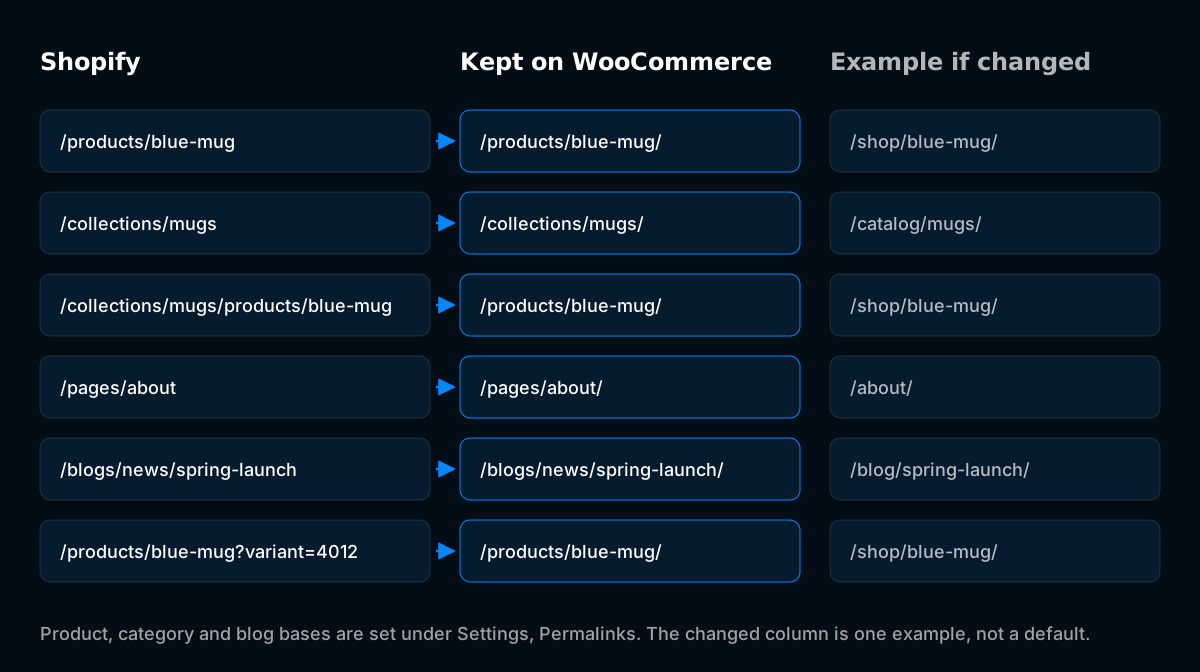
Our view is simple: keep the URL structure 1:1 wherever possible. Every URL that stays the same is a URL that cannot break, needs no redirect and keeps its signals without waiting for Google to reprocess it. Changing the structure is not a problem in itself, as long as every old URL is mapped and redirected properly.
WooCommerce makes the 1:1 approach possible. Unlike Shopify, where /products/, /collections/, /pages/ and /blogs/ are fixed, WooCommerce lets you set your own product base, category base and blog permalinks. That flexibility works in both directions: you can reproduce the Shopify structure exactly, or move to a structure you prefer.
| Content | Shopify URL | Kept on WooCommerce | Example if you change it |
|---|---|---|---|
| Product | /products/blue-mug | /products/blue-mug/ | /shop/blue-mug/ |
| Collection | /collections/mugs | /collections/mugs/ | /catalog/mugs/ |
| Product inside a collection | /collections/mugs/products/blue-mug | /products/blue-mug/ | /shop/blue-mug/ |
| Page | /pages/about | /pages/about/ | /about/ |
| Blog post | /blogs/news/spring-launch | /blogs/news/spring-launch/ | /blog/spring-launch/ |
| Blog tag | /blogs/news/tagged/recipes | /blogs/news/tagged/recipes/ with a custom tag base, or /tag/recipes/ | /blog/tag/recipes/ |
| Variant | /products/blue-mug?variant=4012 | /products/blue-mug/ | /shop/blue-mug/ |
The last column is only an example. WooCommerce ships with /product/ and /product-category/ as its default bases, but those are defaults, not requirements. Any base you choose works the same way, as long as the redirects follow it.
How to keep Shopify URLs on WooCommerce
Set the structure before importing any products, so every item is created with its final URL.
- Products. Under Settings → Permalinks, set a custom product base of /products/.
- Collections. Set the product category base to collections.
- Pages. Create a parent page with the slug pages and place static pages under it, so they resolve at /pages/about/.
- Blog. Set a custom post permalink of /blogs/news/%postname%/. If the Shopify store had several blogs, use categories named after each blog handle and a permalink of /blogs/%category%/%postname%/.
- Slugs. Check after import that every product, collection and post kept its Shopify handle. Migration tools sometimes change slugs that contain special characters or duplicates.
Two differences remain even with the structure kept. WordPress adds a trailing slash, so /products/blue-mug resolves to /products/blue-mug/ through one automatic redirect. And Shopify's nested collection product URLs have no equivalent, so they need one pattern rule:
| Old URL pattern | New URL | Covers |
|---|---|---|
^/collections/[^/]+/products/([^/?]+) | /products/$1/ | Products linked from collections |
Shopify points the canonical tag of these nested URLs at the plain /products/ version, but search engines may still have both on record, so both need a destination.
How to redirect Shopify URLs if you change the structure
If you decide on a different structure, the redirect map does all the work. Every product, collection, page and post gets a rule, and each rule must point at the exact final URL, trailing slash included. A redirect to a version without the slash, followed by WordPress adding the slash, is a chain.
Redirects can live at the server or host level, in a CDN such as Cloudflare, or in a WordPress plugin such as Redirection. Server or CDN rules are faster. Plugin rules are easier to manage. Either works as long as the rules are tested.
The pattern rules below use the example bases from the table above. Replace /shop/, /catalog/ and /blog/ with whatever bases you set.
| Old URL pattern | New URL | Covers |
|---|---|---|
^/collections/[^/]+/products/([^/?]+) | /shop/$1/ | Products linked from collections |
^/products/([^/?]+) | /shop/$1/ | Products |
^/collections/([^/?]+)/?$ | /catalog/$1/ | Collections |
^/pages/([^/?]+) | /$1/ | Static pages |
^/blogs/news/tagged/([^/?]+) | /blog/tag/$1/ | Blog tags |
^/blogs/news/([^/?]+) | /blog/$1/ | Blog posts |
Order matters. The nested product rule has to run before the collection rule, or collection product URLs are sent to category pages. Any product whose slug changed during import needs its own rule above the patterns.
Handle these separately:
- Variant URLs. Configure the redirect to ignore or drop the query string, so /products/blue-mug?variant=4012 lands on the clean product URL.
- Tagged collection URLs such as /collections/mugs/red. Send them to the matching filtered page if you have one, or to the parent category.
- Removed products. Redirect to the closest replacement product or the category. Do not send them all to the homepage.
- The old sitemap URL. Search engines will keep requesting /sitemap.xml. Either serve the new sitemap there or redirect it to /wp-sitemap.xml or your SEO plugin's sitemap.
What breaks quietly after a Shopify to WooCommerce move
Some problems do not show up in a quick launch check. They show up weeks later as missing rich results, broken images or a slower store.
Images in descriptions and blog posts. Images added inside product descriptions and articles are often hosted on Shopify's CDN. Migration tools usually move product gallery images but can leave images embedded in content pointing at Shopify. Search the database for cdn.shopify.com and rehost everything before you close the Shopify store.
Structured data. Shopify themes output Product structured data, and review apps add ratings. WooCommerce outputs basic product structured data, but review stars, brand, GTIN and shipping details depend on your theme and plugins. Test key product pages in the Rich Results Test and compare against what Shopify produced.
Crawl traps. WooCommerce can create crawlable URLs Shopify never had, such as add to cart links, sorting parameters and layered filter combinations. Check that cart, checkout and account pages are not indexed, and that filter and sort parameters do not create thousands of duplicate pages.
Google Merchant Center and feeds. By default the item IDs in the product feed change on the new platform, and Merchant Center treats changed IDs as new products, so their history and Shopping performance data start over. Keep the old IDs instead: store each product's Shopify item ID on the WooCommerce product during the import and use a feed plugin that sends it as the item ID. Then reconnect the feed and check for disapprovals before switching off the Shopify feed.
Performance. A Shopify store runs on Shopify's infrastructure. A WooCommerce store is as fast as its hosting, theme and plugins. Compare Core Web Vitals on product and category templates with the Shopify store before launch, not after.
What you give up in AI shopping when you leave Shopify
Leaving Shopify means leaving its built-in connection to AI shopping assistants, and a WooCommerce store has to replace it by hand. For stores that already get orders through ChatGPT or Google's AI features, that is a real cost of moving and belongs in the decision.
Shopify's Agentic Storefronts connect eligible stores to AI shopping channels including ChatGPT, Google AI Mode and Gemini, Microsoft Copilot and Meta, and are active by default for eligible stores (Shopify Help Center). Its free Knowledge Base app lets merchants give AI agents verified answers about shipping, returns and policies (Craftshift). Shopify also serves agent-discovery files on every store: agents.md as the main file, plus llms.txt and llms-full.txt for older AI crawlers (Shopify Help Center).
WooCommerce doesn't connect stores to AI channels automatically the way Shopify does, but it now has official routes emerging: Stripe is bringing Agentic Commerce Suite support to Stripe for WooCommerce, while Google's AI shopping surfaces can already use Merchant Center product data (WooCommerce). Beyond that, a WooCommerce store has to make itself easy for AI systems to find and read:
- Complete product data and product structured data, including price, stock, GTIN and ratings
- A Google Merchant Center feed, which Google's AI shopping features draw from
- AI search bots allowed in robots.txt and in CDN or firewall rules
- llms.txt and agents.md, which are cheap to add, although AI search crawlers rarely request them (Ezy.ai research)
Letting AI assistants complete the purchase on a WooCommerce store depends on Stripe's agentic checkout becoming available for your store and on each channel's approval and product rules, so check that before you count on it. If you want the store ready for AI search after the move, our AI search optimization service covers it.
Step by step Shopify to WooCommerce migration process
- Save the starting point. Run a full crawl of the Shopify store and save it, along with robots.txt and the sitemap, and make sure analytics, Search Console and rank tracking will keep running on WooCommerce. The website migration SEO checklist covers this step in detail.
- Choose hosting and set up WordPress on staging. Pick hosting sized for your catalog and traffic. Protect staging with a password.
- Decide the URL structure. Keep the Shopify structure 1:1 where possible, or choose new bases and plan the full redirect map. Set permalinks before importing anything.
- Migrate the data. Run the migration tool, then check a sample of products, variants, categories, customers and orders by hand.
- Rehost content images. Replace every cdn.shopify.com reference in descriptions, pages and posts.
- Rebuild the theme and replace apps. Match the templates that drive revenue first: product, category and home.
- Carry over SEO elements. Titles, meta descriptions, headings, alt text, canonicals and structured data on every template.
- Build and test the redirect map. Crawl the full list of old URLs against staging where possible and confirm one hop to a 200 page for each.
- Compare staging with the saved crawl. Look for missing pages, shorter content and changed titles.
- Launch. Switch DNS, remove staging protections, check robots.txt, submit the new sitemap and test top pages individually.
- Keep the Shopify store available until you have verified the move. Do not cancel the Shopify plan until data exports, images and redirects are confirmed on the live WooCommerce site.
- Monitor. Daily checks in the first week, then page by page comparison with the period before launch.
When a Shopify to WooCommerce migration needs a specialist
The risk rises with catalog size, organic revenue and the number of URL patterns. A store with a few dozen products and little search traffic can follow this guide. A store with thousands of SKUs, multiple collections per product, several blogs or international versions benefits from someone who has mapped these patterns before.
Developtify's SEO migration service covers the full move: URL strategy, redirect map, SEO parity checks and post-launch monitoring. After launch, ongoing maintenance keeps the WooCommerce store fast, updated and stable.
Frequently asked questions
Can I keep my Shopify URLs on WooCommerce?
Yes, almost entirely. WooCommerce lets you set the product base to /products/ and the category base to collections, and WordPress permalinks can reproduce the page and blog structure. Only the trailing slash differs, and nested collection product URLs need one redirect rule.
Do I have to use /product-category/ in WooCommerce?
No. /product/ and /product-category/ are WooCommerce defaults. You can keep /collections/ from Shopify or choose any other base, as long as every old URL redirects to the new one.
Will I lose rankings when moving from Shopify to WooCommerce?
Not if every ranking URL is redirected to its equivalent, content is carried over and the new store performs as well as the old one. Temporary movement while Google recrawls the site is common. Lasting losses usually come from missing redirects or missing content.
Do customers need new passwords after the migration?
Yes. Shopify does not export customer passwords, so customers reset theirs on first login. An announcement email at launch keeps this from generating support tickets.
How long does a Shopify to WooCommerce migration take?
It depends on catalog size, the number of apps to replace and how much of the design is rebuilt. Data import is the quick part. Theme work, redirect mapping and testing take most of the time.
Should I cancel Shopify right after launch?
No. Keep the Shopify store available until the live WooCommerce site has been checked, content images have been rehosted and redirects are confirmed working. Closing Shopify first removes your fallback and any assets still hosted there.